
Access Connected Security Cameras in RapidSOS UNITE
Live video provides valuable situational awareness to first responders during an incident
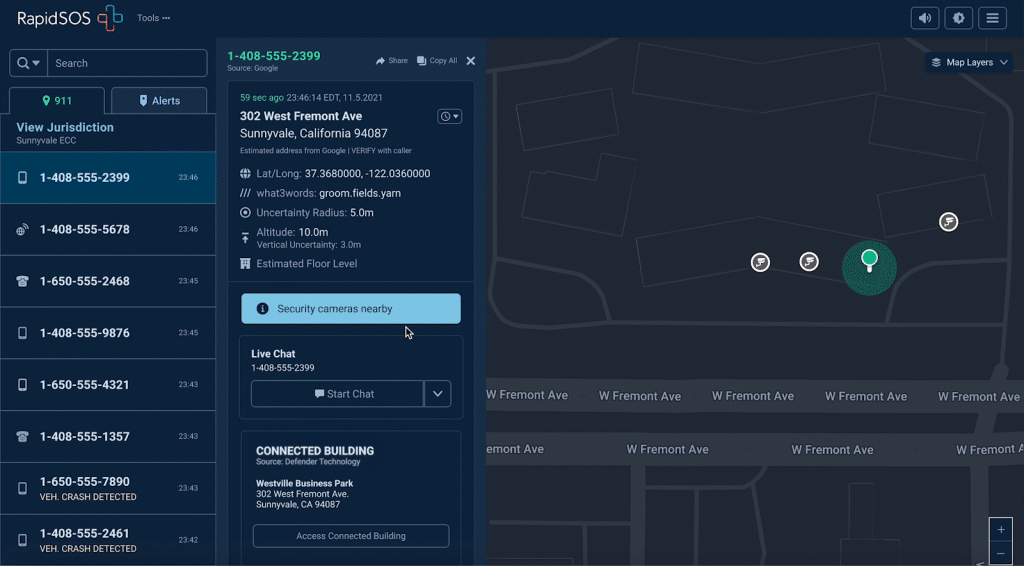
Gain context beyond what's described by anxious callers
Eagle Eye 911 Camera Sharing, in partnership with RapidSOS, provides 911 telecommunicators with immediate access to live video cameras during emergencies – enhancing situational awareness and improving response strategies.
Key Benefits

Quicker verification and reduced miscommunication speed up emergency resolution

Real-time visuals provide a clearer understanding of emergencies, aiding in accurate incident assessment

Provides precise information to first responders, reducing risks and enhancing safety during critical incidents
Eagle Eye 911 Camera Sharing will be a game changer for active shootings, burglaries, alarms, and even medical and fire emergencies. We ask our field responders to manage millions of incidents a year with only the limited information that a distressed caller might be able to provide. 911 Camera Sharing gives us a real-time view of exactly what is occurring at the scene.


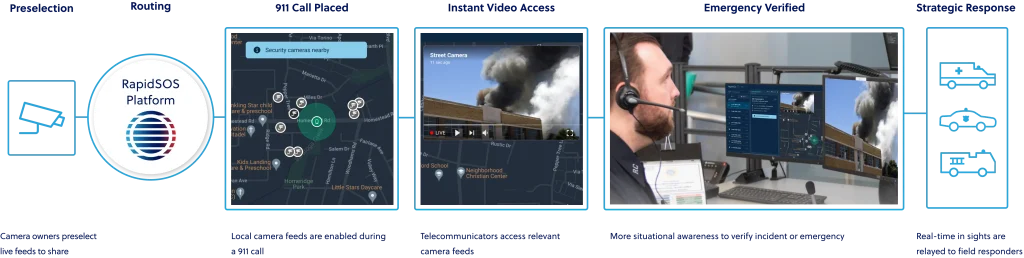
How 911 Camera Sharing Works
FAQs for ECCs
Are all cameras accessible at all times?
No. Enabled cameras only appear on your RapidSOS UNITE map if they fall within a 300 meter radius of a call. This ensures telecommunicators can quickly find the relevant ground-truth information in appropriate scenarios.
How do I know if a camera is accessible?
When you open a call within RapidSOS UNITE, you’ll see a blue banner saying “Security cameras nearby”, as well as icons on the map showing the location of cameras near the incident.
What controls does a telecommunicator have over video content?
RapidSOS UNITE gives agency administrators and telecommunicators controls to manage who accesses video content and in what context. In the Admin section, agency administrators can enable this functionality using existing role-based access controls. Once enabled, a telecommunicator must select a camera icon from the UNITE map in order to open the video player, and then select play to start the live video.
What steps do I need to take to enable this functionality?
Open your RapidSOS UNITE admin here and enable the data source for Eagle Eye connected cameras. Once that step is complete, connected cameras from Eagle Eye Networks will appear, when in the vicinity of an emergency. As additional cameras are enabled in your community, they’ll automatically appear in RapidSOS UNITE when incidents happen nearby.
I’m interested in getting existing cameras in RapidSOS UNITE? How can I do that?
Eagle Eye 911 Camera Sharing is available to Eagle Eye Networks cameras and users of alternative video management systems without needing to migrate to the Eagle Eye Cloud VMS or replace cameras (exclusions apply).
Who can I talk with to purchase connected cameras for my community?
Contact sales@een.com to ask about purchasing connected cameras from Eagle Eye Networks.
Be an early adopter and enable Connected Cameras in RapidSOS UNITE today
